System startup

  • [01] Booting CK OS…
Loading workspace0%
CK

Case study

QuoteLab

Guided service quotes with live totals, shareable links, and PDF export

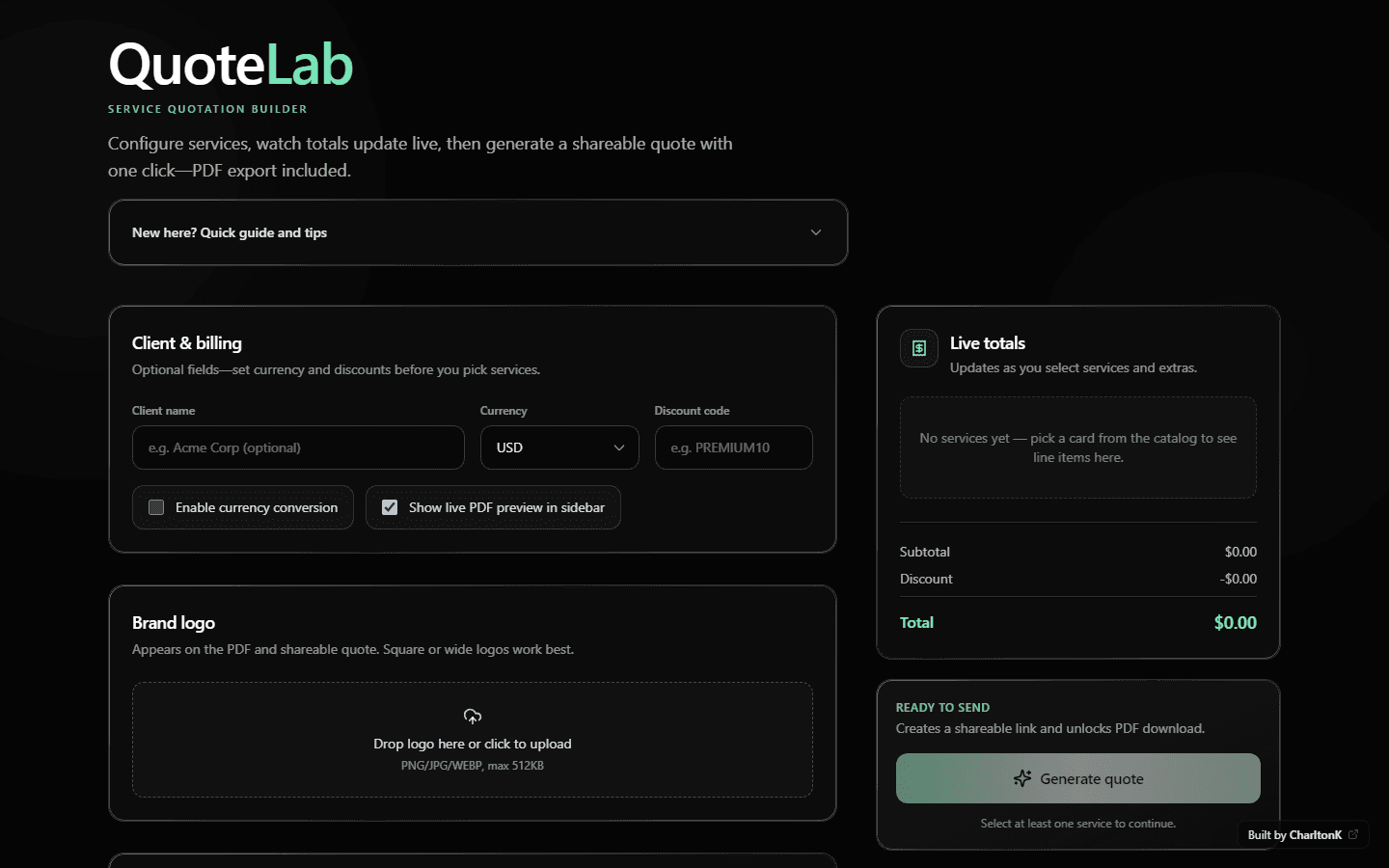
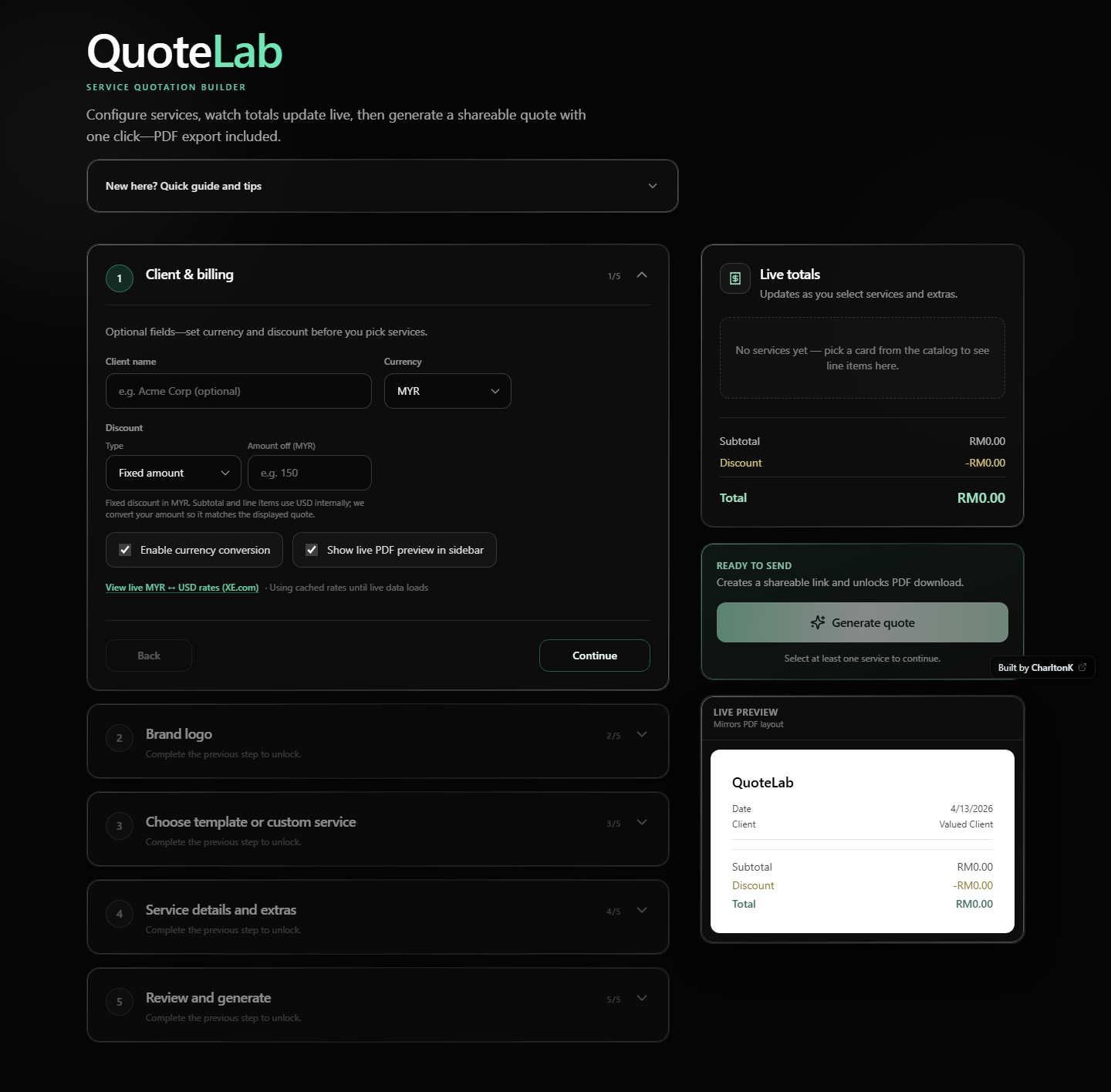
QuoteLab is a browser-based quotation workspace: a five-step accordion walks you from client setup and branding through line items, then review—while a sticky sidebar keeps subtotals, discounts, and an optional live PDF preview aligned with what you export. Generate persists the quote and returns a shareable URL plus download.

QuoteLab live interface: five-step accordion builder, client and billing, brand logo upload, service templates and catalog, live pricing sidebar, PDF preview, and generate quote.

Move your cursor — the preview tilts slightly. Real UI capture from production.

Story

Problem → insight → solution

Three beats — problem, insight, and how the shipped five-step flow addresses it. Scroll-driven, readable as a linear narrative.

01

Problem

Freelancers and small teams still bounce between spreadsheets, ad-hoc PDFs, and chat to produce a quote. Nothing stays in sync—currency, discounts, and line items drift—and clients never see a single surface that updates as the deal changes. The product gap isn’t “more fields.” It’s a guided path: set billing context, build lines from templates or scratch, tune details, then ship something presentable—a shareable link and a PDF that match.
02

Insight

Quoting fails when the tool fights the user. A long form feels like homework; a blank canvas feels unsafe. The win is progressive disclosure: one decision at a time, with the running total always visible so confidence compounds instead of eroding.

03

Solution

QuoteLab is built around a five-step accordion: Client & billing → Brand logo → Choose (templates, custom line, or catalog) → Service details & extras → Review & generate. Each step unlocks after Continue so users can’t skip prerequisites—and collapsed headers show a one-line summary of what’s already set.

Goals

Ship a guided quote flow (accordion steps with unlock-on-continue) instead of an overwhelming single page.
Keep totals honest: currency, optional live conversion (ECB-backed rates in-app), and fixed or percentage discounts applied to a single subtotal model.
Support real catalog data, empty-catalog onboarding via reusable templates, and custom services with sanitized rich-text scope and extras.
Close the loop with persisted quotes (/quote/[id]), PDF export, and a toggleable live preview that tracks the PDF layout.

Code → product

From pricing logic to shipped UI

One compare: implementation detail on top, the live five-step builder and sticky sidebar underneath. Hover or drag to sweep from code-facing structure to the shipped product.

lib/pricing.ts
// Live totals — same module drives UI + PDF export
import type { Service, SelectedService, PricingLine } from "./types";

export interface PricingSnapshot {
  lines: PricingLine[];
  subtotal: number;
  discount: number;
  total: number;
}

function sumLines(lines: PricingLine[]): number {
  return lines.reduce((acc, line) => acc + line.amount, 0);
}

export function calculatePricing(
  services: Service[],
  selected: SelectedService[],
  discountCode: string
): PricingSnapshot {
  const lines = buildLines(services, selected);
  const subtotal = sumLines(lines);
  const discount = applyDiscount(subtotal, discountCode);
  const total = Math.max(0, subtotal - discount);
  return { lines, subtotal, discount, total };
}
QuoteLab product UI

Drag the handle — code on the left reveals the live QuoteLab surface underneath.

Scroll narrative

How the flow holds together

Scroll through this band: the panel stays fixed while you move through three beats. The right column shows abstract slices of the system — not a full-page screenshot.

Client & billing

Client name (optional)
MYR
Discount
% or fixed
FX conversionLive PDF preview

Step 1 of 3 — scroll the page or tap a step on the left.

Capabilities

Built like a product surface

Experience covers the guided accordion and line-item work; Delivery covers totals, preview, persistence, and PDF.

Five-step accordion builder with progressive unlock (Continue / Back)

Client, currency (USD/MYR/EUR), fixed or % discount, optional live FX conversion

Brand logo upload for PDF and share view (size-validated)

Starter templates when the catalog is empty; catalog cards; custom lines with rich-text scope and extras

Dedicated step for quantities, add-ons, and per-line configuration

Sticky pricing panel with live subtotal, discount, and total

Toggleable live PDF preview that mirrors export layout

Generate quote → persisted share link and PDF download (@react-pdf/renderer)

Product overview

A quotation workspace that behaves like a product—not a printable accident.

The current app centers on a five-step accordion, live pricing, optional FX conversion, template onboarding, rich custom lines, persisted share URLs, and PDF export. The case study below tracks that shipped surface area.

Signals

What shipped — in numbers

Counts tied to the actual build: no vanity KPIs, just scope made legible.

0

Guided steps

Accordion · unlock on Continue

0

Shipped capabilities

Flow · totals · preview · PDF · link

0

Quote currencies

USD · MYR · EUR

Challenges

  • Keeping unlock rules fair: Continue advances the journey without trapping users—Back, clear selection, and a hidden demo reset (Ctrl+Alt+0) recover state.
  • Parity between HTML preview and PDF output—shared payload fields, line details, extras, and logo handling across render paths.
  • Pricing clarity when conversion is on: totals must read as trustworthy, with rate provenance surfaced next to the controls.
  • Persisted quotes via Prisma/API: choosing a storage story that fits demos (SQLite) while staying honest about production hosting constraints.

What I learned

  • Shipping “confidence UI” matters as much as math: if people trust the sidebar, they’ll finish the quote.
  • Accordion + sticky summary is a strong pattern for B2B mini-workflows—provided summaries on collapsed steps stay scannable.
  • Polish is mostly rhythm: spacing, type scale, and predictable interactions across light/dark glass surfaces.

Stack

Next.js App Router and React for the builder and sidebar; Tailwind for layout and theme; Prisma for persisted quotes; Framer Motion for accordion and feedback. Clear split between step content, pricing state, and PDF payload.

Next.jsReactTailwind CSSPrismaFramer Motion

UX & design decisions

Progressive disclosure reduced cognitive load: the accordion hides secondary work until each step is relevant, while the sidebar preserves global context (totals and preview) without duplicating every control.

Empty-catalog state surfaces starter templates so the first quote isn’t a cold start; catalog mode explains that quantities and extras come in the next step, matching the real unlock order.

Discount UX distinguishes fixed amount vs. percentage with inline hints; conversion and “show live PDF preview” are explicit toggles so power features don’t read as mandatory.

Solution — detail

The main column handles configuration; a sticky sidebar holds the pricing breakdown, optional live PDF preview, Generate quote (POST to persist), and download—so feedback stays in view on large screens and stacks cleanly on mobile.

Custom services use the same pricing model as catalog items; the preview and @react-pdf/renderer output share the same payload shape so “what you see” stays aligned with what gets emailed.

See QuoteLab in motion

The demo is the proof — five-step accordion, sticky totals, live preview, persisted share links, and PDF. This page is the pitch; the product is the receipt.

Visit live demo